
Mazda CX-3: Before Using the Audio System / Antenna

 AUX/USB mode
Audio can be heard from the vehicle's
speakers by connecting a
commercially-available portable audio
unit to the auxiliary jack.
A commercially-available, non-impedance
stereo mini plug cable is required...

Other information:
Mazda CX-3 (2015-2026) Owner's Manual: Agreements and disclaimers related to Apple CarPlay™
This unit is compatible with Apple CarPlay™ which can operate an iPhone® using the vehicle's audio device. * iPhone, Siri and Apple Music are registered trademarks of Apple Inc. * Apple CarPlay is trademarks of Apple Inc. * iOS is a trademark or registered trademark of Cisco in the U...
Mazda CX-3 (2015-2026) Owner's Manual: Identification Numbers
Vehicle Identification Number The vehicle identification number legally identifies your vehicle. The number is on a plate attached to the cowl panel located on the left corner of the dashboard. This plate can easily be seen through the windshield...
Categories
- Manuals Home
- Mazda CX-3 Owners Manual
- Mazda CX-3 Service Manual
- Speedometer
- When Driving
- TCS OFF Switch
- New on site
- Most important about car
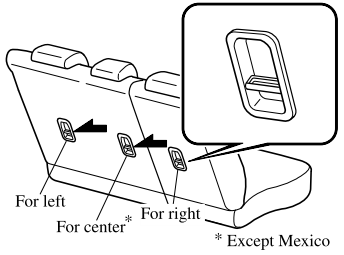
Anchor Bracket
Anchor brackets for securing child-restraint systems are equipped in the vehicle. Locate each anchor position using the illustration.
To install a child-restraint system, remove the head restraint. Always follow the instruction manual accompanying the child-restraint system.
Anchor bracket location
Use the indicated anchor bracket locations when installing a child-restraint system equipped with a tether.

Copyright © 2026 www.macx3.net