Mazda CX-3: Audio Set [Type B (touchscreen)] / Available Language
The Bluetooth® Hands-Free System applies to the following languages:
- English
- Spanish
- French
 Changing PIN code
PIN code (4 digits) can be changed.
Select the icon on the home
screen
to display the Settings screen.
Select the tab.
Select .
Select .
Select ...
 Bluetooth® Audio
Applicable Bluetooth® specification (Recommended)
Ver. 1.1/1.2/2.0 + EDR/2.1 + EDR/3.0
(conformity)
Response profile
A2DP (Advanced Audio Distribution
Profile) Ver...
Other information:
Mazda CX-3 (2015-2026) Owner's Manual: Changing PIN code
P..
Mazda CX-3 (2015-2026) Owner's Manual: How to use USB mode
This unit does not support a USB 3.0 device. In addition, other devices may not be supported depending on the model or OS version. Playback Switch the ignition to ACC or ON. Press the power/volume dial to turn the audio system on. Press the media button to switch to the USB mode and start playback...
Categories
- Manuals Home
- Mazda CX-3 Owners Manual
- Mazda CX-3 Service Manual
- Identification Numbers
- Trip Computer and INFO Switch (Some models)
- Mazda Radar Cruise Control with Stop & Go function (MRCC with Stop & Go function) Display Indication
- New on site
- Most important about car
Floor Mat
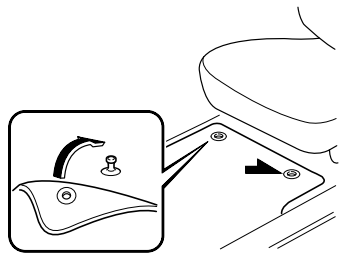
We recommend the use of Genuine Mazda floor mats.
WARNING
Make sure the floor mats are hooked on the retention pins to prevent them from bunching up under the foot pedals: Using a floor mat that is not secured is dangerous as it will interfere with the accelerator and brake pedal operation, which could result in an accident.
Do not install two floor mats, one on top of the other, on the driver's side: Installing two floor mats, one on top of the other, on the driver's side is dangerous as the retention pins can only keep one floor mat from sliding forward. Loose floor mat(s) will interfere with the foot pedals and could result in an accident. If using an all-weather mat for winter use always remove the original floor mat.