
Mazda CX-3: Theft-Deterrent System (Some models) / To Stop the Alarm
Mazda CX-3 (2015-2026) Owner's Manual / Before Driving / Security System / Theft-Deterrent System (Some models) / To Stop the Alarm
A triggered alarm can be turned off using any one of the following methods:
- Pressing the unlock button on the transmitter.
- Starting the engine with the push button start.
- (With the advanced keyless function)
- Pressing a request switch on the doors.
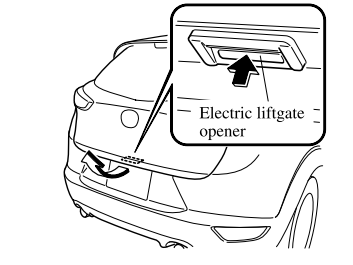
- Pressing the electric liftgate opener while the key is being carried.
The hazard warning lights will flash twice.
 To Turn Off an Armed System
An armed system can be turned off using
any one of the following methods:
Pressing the unlock button on the
transmitter.
Starting the engine with the push button
start...
 Driving Tips
..
Other information:
Mazda CX-3 (2015-2026) Owner's Manual: Maintenance Monitor (Type A audio)
“Oil Change” with a flexible setting*1 is available. Consult your Authorized Mazda Dealer when you want to change the setting*2. Once the system turns on, the wrench indicator light in the instrument cluster will be illuminated when remaining oil life becomes less than 1,000 km (600 mile), or remaining days are less than 15 (whichever comes first)...
Mazda CX-3 (2015-2026) Owner's Manual: Light Bulbs
WARNING Never touch the glass portion of a halogen bulb with your bare hands and always wear eye protection when handling or working around the bulbs: When a halogen bulb breaks, it is dangerous. These bulbs contain pressurized gas. If one is broken, it will explode and serious injuries could be caused by the flying glass...
Categories
- Manuals Home
- Mazda CX-3 Owners Manual
- Mazda CX-3 Service Manual
- TCS OFF Switch
- Recommended Oil
- Auto Lock/Unlock Function
- New on site
- Most important about car
Opening and Closing the Liftgate
Opening the liftgate with Electric liftgate opener
Unlock the doors and liftgate, then press the electric liftgate opener on the liftgate and raise the liftgate when the latch releases.

Copyright © 2026 www.macx3.net